
Download Upwave – Project Management, Task Management, Team Collaboration
Overview
Upwave is a desktop application designed to streamline project management and team collaboration for remote and distributed teams. The software enables users to organize tasks, assign responsibilities, set deadlines, and track progress in real time. It is tailored for professionals and teams seeking to improve productivity, reduce meeting frequency, and maintain alignment across departments or global locations. With features such as task delegation, file sharing, and real-time updates, Upwave helps teams stay focused and accountable.
Designed with flexibility in mind, the platform supports customizable workflows, allowing teams to adapt the tool to their specific processes—whether agile, Kanban, or traditional project management. The inclusion of calendar integrations, weekly summary reports, and export options to .csv ensures that project data remains accessible and actionable. Upwave is used by teams worldwide, particularly those managing complex projects with multiple stakeholders and remote contributors.
The developer, Upwave, has positioned the software as a solution for modern work environments, emphasizing efficiency, transparency, and team motivation. A 14-day free trial is available with unlimited projects and team members, after which the pricing model transitions to $4 per user per month. The application is accessible across Windows, Mac, and Linux platforms, making it suitable for diverse technical environments.
Key Features & Capabilities
- Task Delegation and Assignment: Assign specific tasks to team members with clear ownership and due dates, ensuring accountability and timely delivery.
- Real-Time Collaboration: All updates, comments, and file attachments are synchronized instantly across devices, enabling seamless teamwork regardless of location.
- Calendar Integration: Sync project deadlines and milestones with Google Calendar, iCal, and Outlook for better time management and visibility.
- File Sharing and Comments: Attach documents, images, or notes directly to tasks and engage in threaded discussions to keep context intact.
- Workflow Customization: Design workflows that match your team’s process, whether using Kanban boards, sprints, or linear task lists.
- One-Click High Five Rewards: Recognize team achievements instantly, fostering a positive work culture and boosting morale.
- Slack Integration: Receive project updates and task notifications directly in Slack, reducing context switching and improving responsiveness.
- Project Archiving: Archive completed projects and tasks to maintain a clean workspace without losing historical data.
- Weekly Team Summary Reports: Automatically generate reports that highlight progress, completed tasks, and upcoming deadlines.
- Export to .csv: Export task and project data for external analysis, reporting, or archival purposes.
These capabilities make Upwave particularly effective for teams managing multiple concurrent projects, coordinating remote workers, or aiming to reduce reliance on lengthy status meetings. The ability to customize workflows and integrate with existing tools like Slack and calendar apps enhances its adaptability across different work environments.
User Interface, Workflow & Performance
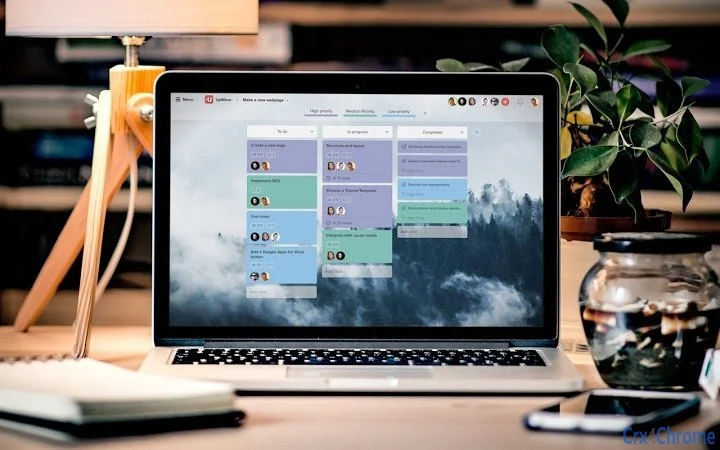
The user interface of Upwave is designed for clarity and efficiency, with a clean layout that prioritizes task visibility and navigation. The dashboard presents an overview of active projects, upcoming deadlines, and team progress at a glance. Task cards are displayed in a modular format, allowing users to drag and drop items between columns—ideal for Kanban-style workflows.
Navigating between projects, tasks, and team members is intuitive, with a sidebar menu and search functionality that helps users locate content quickly. The workflow is streamlined, minimizing the number of clicks required to assign a task, add a comment, or update a deadline. Real-time updates ensure that changes made by one user are immediately visible to others, supporting collaborative decision-making.
Performance details were not specified by the developer. However, based on general software behavior, the application is expected to operate smoothly on modern systems with minimal lag during standard usage. The 10.2 MB installation size suggests a lightweight footprint, which may contribute to faster startup times and lower memory consumption. The developer did not provide additional system requirements or resource usage details.
Compatibility & System Requirements
Upwave is compatible with Windows, Mac, and Linux operating systems, making it accessible to a broad range of users across different computing environments. The software is available as a desktop application, ensuring a consistent experience across devices. The current version is 2.0.1, with a file size of 10.2 MB, indicating a compact and efficient installation.
Exact system requirements were not listed. The developer did not specify minimum CPU, RAM, or storage needs. Platform compatibility information is limited to the supported operating systems. Users are advised to ensure their system meets standard desktop application requirements for optimal performance.
Pros and Cons
Pros
- Intuitive interface designed for quick onboarding and daily use
- Real-time collaboration across team members and locations
- Supports customizable workflows for diverse team needs
- Seamless integration with Slack, Google Calendar, and other tools
- Lightweight installation at 10.2 MB
- Free 14-day trial with unlimited projects and users
Cons
- No detailed system requirements provided by the developer
- Performance behavior under heavy workloads not specified
- Price increases after the free trial period
- Limited information on offline functionality
FAQ Section
Is Upwave available for Windows, Mac, and Linux?
Yes, Upwave is compatible with Windows, Mac, and Linux operating systems, offering a consistent desktop experience across all platforms.
Is the software secure and private?
Upwave offers invite-only private projects, ensuring that only authorized team members can access sensitive project data. The developer did not provide additional security details.
How often does Upwave release updates?
Upwave releases updates to improve functionality and address user feedback. The current version is 2.0.1, and users are encouraged to keep their software up to date.
What is the licensing model for Upwave?
Upwave offers a free 14-day trial with unlimited projects and team members. After the trial, the pricing is $4 per user per month. The software is subscription-based.
Can I use Upwave offline?
Information about offline functionality was not provided. The software may require an internet connection for real-time updates and collaboration.
Final Thoughts + CTA
Upwave stands out as a practical and user-friendly project management tool for teams aiming to enhance collaboration, accountability, and productivity. Its clean interface, real-time synchronization, and integration with essential tools like Slack and calendar apps make it a strong contender in the productivity software space. The ability to customize workflows and generate automated reports adds significant value for teams managing complex or dynamic projects.
While the lack of detailed system requirements and performance data limits in-depth evaluation, the lightweight installation and cross-platform availability suggest broad accessibility. The free trial allows teams to test the software thoroughly before committing to a paid subscription.
For remote teams, agile squads, and organizations seeking to reduce meeting overhead and improve task visibility, Upwave offers a compelling solution. It is particularly well-suited for professionals in design, development, and project coordination roles.
Download Upwave now to experience a smarter way to manage projects and collaborate as a team.







